Huwebes, Abril 30, 2015

MS Excel

     One of the skills that I really want to learn is the skill in Microsoft Excel. Nowadays, it is important to have skill about it especially in the works that require skills in computer specifically in MS Office. Working with excel is not that easy. There are many commands that you need to learn in order to be familiar with the works in excel. Each icon has its own function. You need to know the purpose and how it is used. To be able to do that, you read books about excel or you can find the tutorial in the internet. You can also read in the help  portion of excel. It is located in the upper part on the right side of excel. For me, it is better to have a coach while studying it. As you practice, you do it.

     I have knowledge in excel but a little only. Before, I studied about it on my own and I learned something but I was not able to practice/use it most of the time so I forgot about it. It is really important to practice or use what you have learned so that it will remain in your mind. I am glad that in our Educational subject it was tackled. Our professor gave an example on how to apply the different commands, and I’m happy because again I learned something. I got happy when I learn new things, ideas, experience etc. I’d like to introduce you what is MS Excel.

What is MS Excel?
Excel is a spreadsheet application developed by Microsoft for Microsoft windows, Mac OS and iOS. It features calculations, graphing tools, pivot tables, macro programming language called Visual Basic for Applications. Excel is massive application with 1000s of features and 100s of ribbon (menu) command. It is very easy to get lost once you open excel. So one of the basic survival skills is to understand how to navigate Excel and access the features you are looking for. When you open excel, this is how it looks.


The Excel Window


Starting the Excel Processing Program
1.    Click the Start button
2.    Point to all programs
3.    Point to Microsoft office
4.    Click on Microsoft office excel

The Ribbon
The Ribbon is the panel at the top portion of the document. It has seven tabs which are Home, Insert, Page Layout, Formulas, Date, Review and View.

Home Tab
          You can do things like formatting, alignment, inserting and deleting rows or columns, sorting and filtering numbers, applying styles and formatting effects, finding and replacing data and much more using the Tab. This Home tab displays commands which are grouped as Clipboard, Font, Alignment, Number, Styles, Cells, Editing. Each icon has its function.


Insert Tab

     You can insert things pictures, clip art images, smart art graphics, charts, Pivot tables, hyperlinks, header and footer sections, etc., using this Tab. This Insert tab displays the related commands which are grouped as Tables, Illustrations, Charts, Links, and Text.


Page Layout
This Page Layout tab displays the related commands which are grouped as Themes, Page Setup, Scale to fit, Sheet Options, Arrange.  


Formulas

     The Formulas Tab greatly simplifies the task of number crunching. It has the following groups: Function Library, Defined Names, Formula Auditing, and Calculation.


Data
          
     Using this tab, you can import data from external sources including but not limited to a text files, Microsoft Access databases, web pages, xml documents, Microsoft Query, Microsoft SQL Server databases. The Data displays the related commands which are grouped as Get External data, Connections, Sort & Filter, Data Tools, Outline, and Analysis.


Review

This Tab has functionality that will let you proof read your Excel workbooks, add and delete comments, protect and unprotect Excel sheets/workbooks and finally allow users to track changes in a multi user Excel workbook. The Review Tab has the following Groups: Proofing, Comments, and Changes.


View
           
     Using this Tab, you can control the layout and view of your Excel Workbook.  This is especially important when you are done working on a spreadsheet and are finally ready to print it. It displays the related commands which are Workbook Views, Show/Hide, Zoom, Window, Macros.


        These are the important areas and parts of Microsoft Excel. You have to be familiar with these in order for you to get started with excel. I gave you the images/screen of every tab for you to be familiar. Next time I’m going to place here the assignment that we did for our subject.


Miyerkules, Abril 29, 2015

ONLINE Service

Another topic that we need to explore in our Educational Technology subject is Quipper and Engrade. We were instructed to open an account either in quipper or engrade. These two e-learning can load instructional materials. If a teacher wants his/her students experience smarter, quick, fun education, he/she can use Quipper and Engrade.
            
Our professor instructed us to open an account and create a section/class on e-learning and I chose Quipper. Our professor said that we will use it as our class. We will act as teacher, and we have to invite five persons from our classmates as our students. I thought it was hard to do. When I decided to create my own, I went to quipperschool.com. There are two portals, the Teacher and the Student portal. If you are a teacher, you go to the teacher portal and your students will go to the student portal to join your class. 


To help you more understand on what quipper all about is and how to create an account, you can watch this video.


This is my class


 Truly I had fun in quipper. At first, I was confused where to go to learn about it. But if you’re going to find out and explore it, you will know how to use it in your class. When I gave an assignment in my class, I felt like I’m a real teacher. I chose English subject for high school students. The subject has different topics and all you have to do is choose among them. Just click on the topic that you want. The good thing is there are lessons that a students can read before they can answer the questions and it adds knowledge to them. As the student answers the questions, he/she will be excited because after each question, it will automatically tell you if you got the right or wrong answer. The effect of the right and wrong answer is exciting and it has impact to the one doing it. For me, this kind of class is something that a student wants to experience especially that we are in a digital world now. If you allow your students to experience things they want, they become more interested. As a teacher, you have to find other ways to make your students not just learn, but also have fun at the same time.

What are you waiting for teachers? Get started with the Quipper school now!

Huwebes, Enero 1, 2015

Knowing Media Text


Our professor started the discussion with a question on what comes in our mind about the word TEXT. The first thing that came in my mind is it’s about letters, and then message. Also fun to say, it came in my mind that it’s about texting in cellphone, as text or texting is very common now. I had fun because I and my classmates had different answers, especially when others said that it’s about texting in cellphone. After all the answers from us, our professor said that Text can be letters, words, message, meaning, now it is clear to me that text conveys meaning or message and it can be a photo or video.


In doing media text, you have to consider the three factors such as physical form, economic value, and the meaning. Physical form is the output of media and physical form as artefact such as disc, newspaper, downloadable music. Economic value is in terms of commodity status, cost and price of media production. Meaning must value generation. Example for this is the commercial in television, if what aspect of life is being touch like if it is physical, psychological, or intellectual. In presenting a media text, there are questions that need to be considered. We have to consider the TEXT, AUDIENCE, and PRODUCTION and should be centered with a meaning. It is important that the text gives values to the audience. In media text, it is important to be careful and to take responsibility in every message like we should avoid hurting our audience. Whatever message we want to send, it is good that the messages have impact to the audience because they are the one judging or criticizing our messages. Whatever we want to convey to them, it is important that they receive it well. That the text we want our audience to know has impact to them.


You'll really savor its delectable taste!

Huwebes, Disyembre 25, 2014

Happy Birthday Baby Jhen!


MOVIE MAKING


Another new learning that I get from my Educational Technology subject. As I've said in my previous blogs, I said that most of the lessons that we have tackled in our educational technology subject are new to me. The blogging, Photoshop, photography, media text, and now the MOVIE MAKING. All the works about the lessons are new to me. I was nervous because I’m not good in computer. But even if I’m not good in it, I still try my best to learn because I know that these can help me to develop skills. And as a student who is taking up education, these can help me to present something in my classroom. As our professor gave an example of movie making, I was really happy because a new learning came to me that is far from what I expect to myself. When you create your own movie presentation, you will be happy about the result especially me that is appreciative when new things came to me. The steps are simple to follow. Here is what I did. A sort video. I hope you like it.


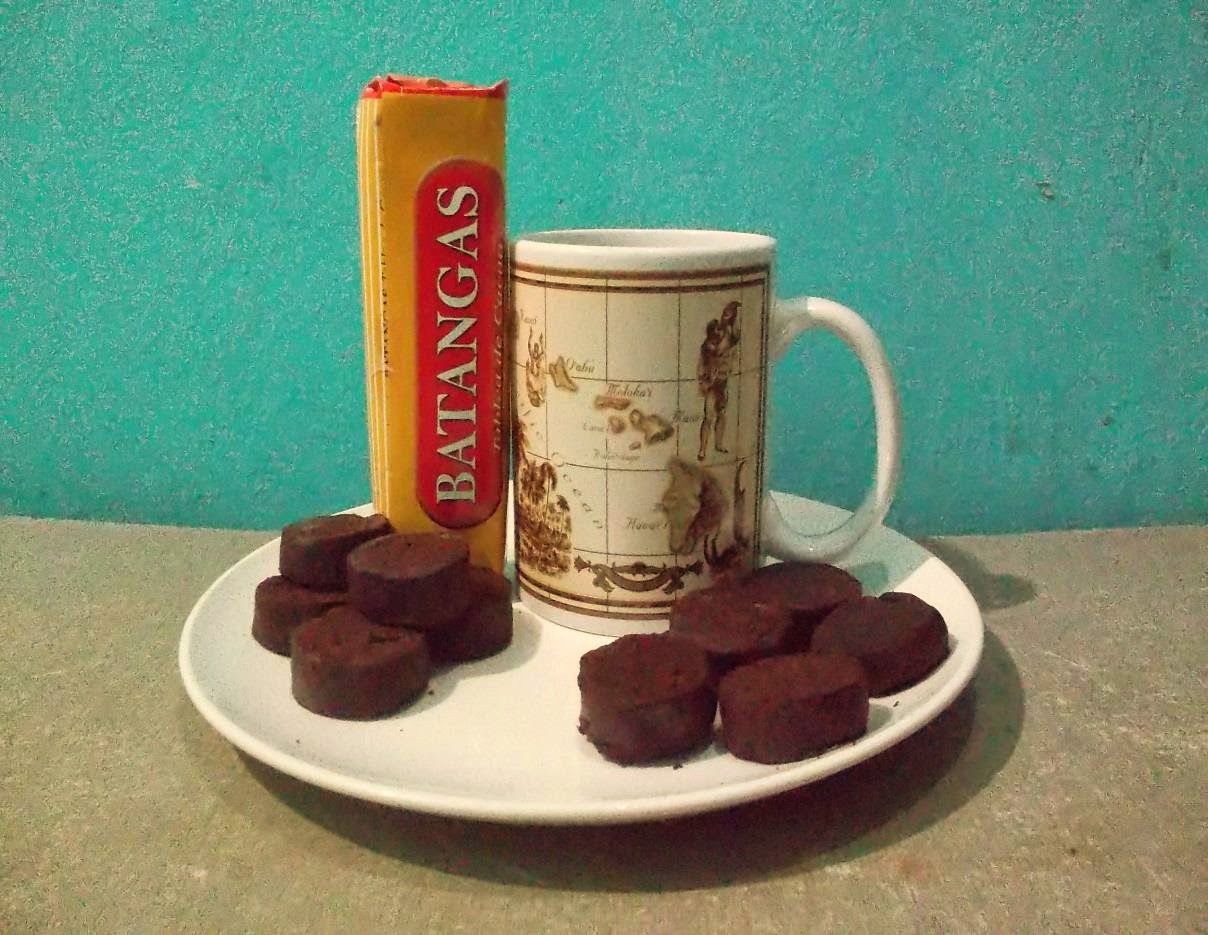
BATANGAS Tablea de Cacao

MEDIA TEXT

What is this?

          BATANGAS Tablea de cacao. The native chocolates produced by Jamla Corporation. It catches the taste of many constituents of Batangas and its neighboring provinces.

Can you name three things like it?
          Batangas Tablea de Cacao is like coffee or chocolates. It is like other tableas but this one is different for this is from Batangas, and as we know the province of Batangas produces one of the best cacaos in the Philippines, due to its suitable tropic weather.

What colours and shapes do you see?


          Batangas Tablea de Cacao comes in forms like balls, thick flat discs, or even in squares, but the discs and balls are the most common. The colors include black and white. But the common is black because cacao beans are being roasted. The cacao fruits are green, brown, purple, and yellow and have plenty of seeds.

What values do you see?

          Tableas are traditionally used in the Philippines to make hot chocolates. Tablea seeks to continue this tradition and Filipinos are enjoying it as they experience to taste its deliciousness. While you are preparing on how to make a tsokolate from Batangas Tablea de Cacao, you can see its simplicity and with labor of love. You learn to value the importance of cacao tree as it gives you a unique tsokolate to experience. You share it with your friends and loved ones and they’ll surely be delighted.

Why do you like it?
          I like it because it gives a different feeling of deliciousness as you are prepare it for a tsokolate or for champorado. Its Tsokolate is delicious and perfect on its own, and you can enjoy it with ensaymada, churros, pan de sal, doughnuts, rice cakes, rice crispies and oats. Also, ideal for champorado and other recipes requiring chocolate. You’ll really savor its delectable taste. It has also benefits like it has rich antioxidants which promotes good cholesterol while lower the bad cholesterol. It lowers risk of cancer due to high content of antioxidant. It helps also improve the heart function.


Would your parents like it?
          Yes, my parents would like it. My parents would love the taste. Your parents can jazzed up a bit. They can use milk instead of water for an even creamier brew. It can relieve stress and can release happy hormones. So, your parents would love it as it has health benefits and at the same time it is delicious.

Would you buy this?
          Yes, I would by this. I have to try to believe.

Who else would want it?
          Coffee or tsokolate lovers would like it especially the elders.

Who makes this?
          This product is made by JAMLA Corporation, located at Mandaluyong City.

Where is it made?
          It is made in the Philippines. It is made from cacao beans.

Where might you buy this?
          You can buy this at Supermarkets such as SM, Robinsons. Available also in Ministop, Rustan’s Shopwise, Puregold, Waltermart, Ever, Lianas, Cherry, Eunilane, Isetann, Tropical Hut, Sta. Lucia, Parco, Anson, Unimart, Makati, Cash & Carry, Landmark, CVC, Purity, Gaisano Malls. Institutional customers include hotels, restaurants and coffee shops.

How much do you think it costs?
            It costs 70 pesos (10 pcs.).

Have you seen a commercial for it on TV, in a book or newspaper, website, or game?
I’ve never seen any commercial about it.

                  
        I hope in one day, we can play a role in reinvigorating the Filipino cacao growing industry!

The meaning of Educational Technology PowerPoint

http://www.slideshare.net/lhenluz18/educational-technology-ppt-final

It's fun in PHOTOSHOP

Another subject that we have tackled in our subject Educational Technology is the Photoshop. Adobe Photoshop is a graphics editor that is one of the most popular programs for image manipulation. It is used widely by graphics professionals. It helps the graphics artist to complete his task.
         At first, I don’t have much interest in Photoshop, because I find it hard and I don’t have much idea about it too. I was once affected by the different arguments against Photoshop. The manipulation of pictures and I disagree about it. You come up with a picture that is different from the real one. Why are some people doing it or manipulating pictures? What are their reasons? For me it is not fine. But the turning point was when Photoshop was introduced to us in our class.
           
         My perception towards Photoshop changed. I begin to appreciate its works and enjoyed as well. I was really amazed when our professor gave an example on how to edit a picture like how to make your skin smoother, how are you going to move your pictures to other places to look that you’ve been there, and how to edit some parts of the pictures to look that they were not there. It is not often noticed by some, but when you begin to experience it, you’ll surely like it. It is truly a blessing to me and to other users, because you can perform functions that give wonderful results. You will be happy and surprised for the results. It gives you happiness and you become to appreciate editing pictures. There’s a different feeling that you’ll surely like to experience. Some of the works that you can do in Photoshop is to convert photos to black and white, resize them, combine techniques, and create different effects and many others. Another is the photo restoration; pictures become damaged by time and exposure. So, the tools found in Photoshop can be used to repair some of the damages. You will find out that there is really MAGIC in PHOTOSHOP.
           
As a beginner, I do not possess the expertise to create good photos. But as I am trying to create on my own or with coach, I am always glad to see how the photos look like after editing it. Also, I learn from my professor that in order to learn more, you have to practice it even without coach. Then you will find out how good you are in it. By practicing it, you will discover something and your knowledge and skills will increase. Also, you will know which tool is used to give a good result. All you have to do is have fun while doing it. Here is the picture that I edited.

                                 
BEFORE                                                                            

                                                                              AFTER

There are two men included in the picture. I’d like to remove them in the picture to see how the picture looks without them. Here is the result.

I know that there are still arguments against Photoshop. But for me, it doesn’t should matter. I love Photoshop now and I believe it is the most important design tool available today. What makes it great for me is the creative process. You creativity will be exercised and can be applied. I suggest you to practice more and you will become expert. There is really a call for Photoshop because it is really important part of the process design.

As it is taught to us, I will continue experimenting the actions, steps, process on it because I really want to learn more. The results or outputs of it give me excitement and happiness. It is really priceless when it comes to the process of designing. There is really magic in Photoshop. For the sake of creativity, happiness, fun, priceless experience, I will stick with Photoshop because IT’S FUN IN PHOTOSHOP!